Mermaid, DBML, backlinks and a graph — offline, from any folder.
An LLM writes [[Attention Is All You Need]]; the file is
attention-is-all-you-need.md. Detangle resolves it, tells you which
rule it used, and lists every link it couldn't.
[[Attention Is All You Need]]->entities/attention-is-all-you-need.mdnormalized-name[[getting started#What's next?]]->wiki/getting-started.md#whats-nextcase + slugified-anchor[Setup](wiki/setup)->wiki/setup/index.mdfolder-index![[diagram.png|300]]->assets/diagram.png (width 300)extension probe[[Vaswani]]->entities/vaswani.mdnote-relative path[[Transformer]]->AMBIGUOUS: concepts/…, entities/…needs a choice[[Dose Response]]->unresolved3 inbound
Seven links from the demo wiki. Six resolve; one of them by a rule no other viewer
tries, and the last one is reported rather than hidden.
Resolution
Your links don't have to be perfect.
Every other viewer matches link text against filenames and shows you a dead link
when they differ. Detangle tries fourteen rules in order, stops at the first that
matches, and tells you which one fired. Thirteen of them are the machine guessing
at your wiki. You write the fourteenth.
the chain, in order
1 exact vault path [[wiki/setup/index]] 2 note-relative path a sibling of this page 3 case-sensitive filename [[setup]] 4 path suffix [[setup/index]] 5 case-insensitive filename [[Setup]] 6 normalized name [[Attention Is All You Need]] 7 alias or title aliases:, title:, first H1 8 identifier id:, uid:, permalink:, slug: 9 folder index [Setup](wiki/setup)10 encoding variant %20, NFC vs NFD11 extension probe ![[diagram]]12 nearest name suggested, never followed13 placeholder reported, not hidden14 remembered choice you settled this one
A guess always looks like a guess.
Exact matches are drawn as ordinary links. Anything resolved by a fallback
gets a dotted underline and a hover that names the rule and the file. A viewer
that guesses silently is worse than one that fails loudly.
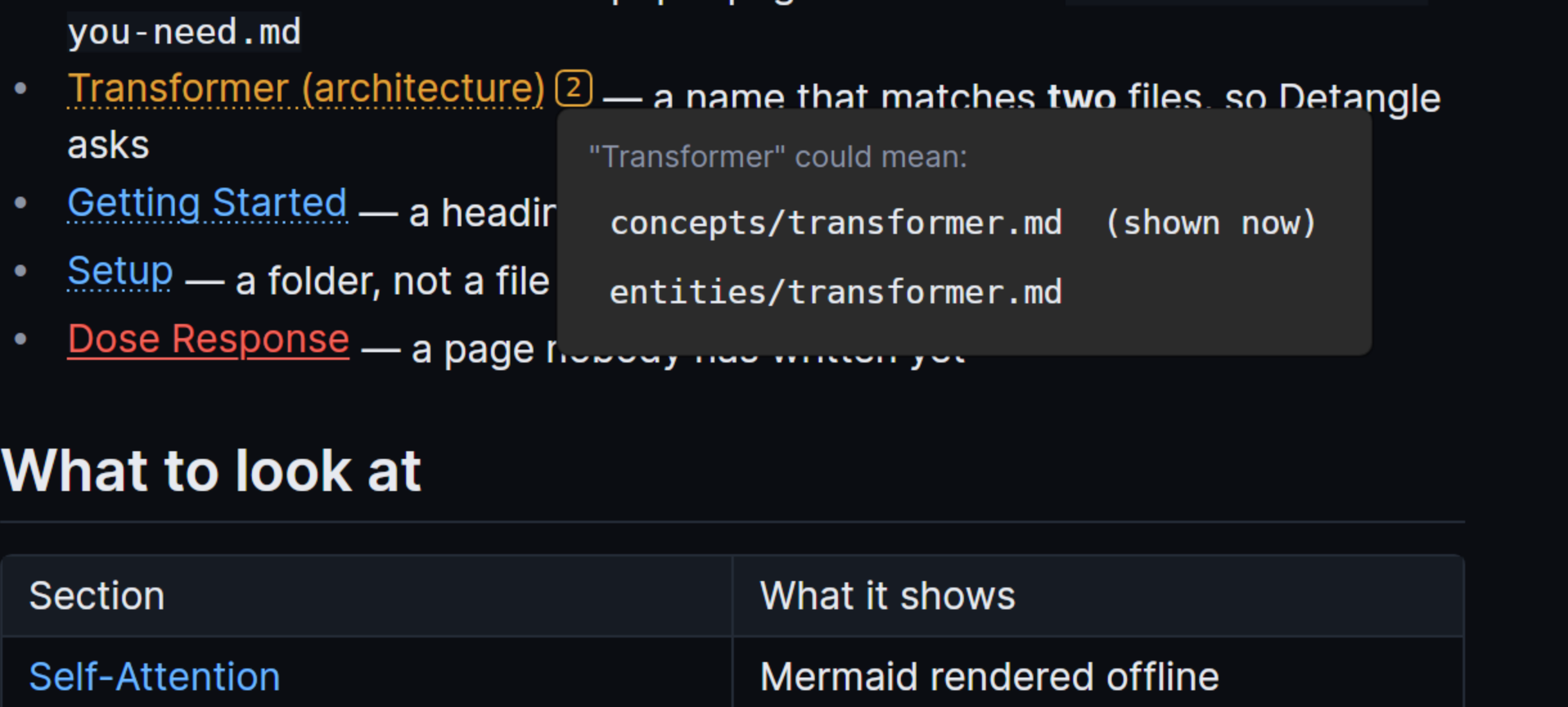
Ambiguity is a question, not a coin flip.
When a name matches two files, both are listed, the shortest path is used
meanwhile, and your choice is remembered for that vault.
Frontmatter references are links.
sources:, related:, parent: and five
more spellings are resolved like any other link. Dropping them is why other
tools' graphs are smaller than the wiki really is.
Anchors survive prose.
#What's next? matches the heading it names — raw text first,
then the slug, then block ids, uuids, line ranges and PDF pages. A fragment
that misses never costs you the page.
Diagrams
Mermaid and DBML, rendered offline.
No Node, no Chromium, no CDN, and no network access of any kind. Both renderers
are .NET libraries running in the same process as the reader.
Mermaid
Twenty-four diagram types through a pure .NET implementation. Renders are cached
beside the vault by source and theme, so re-opening a page is instant.
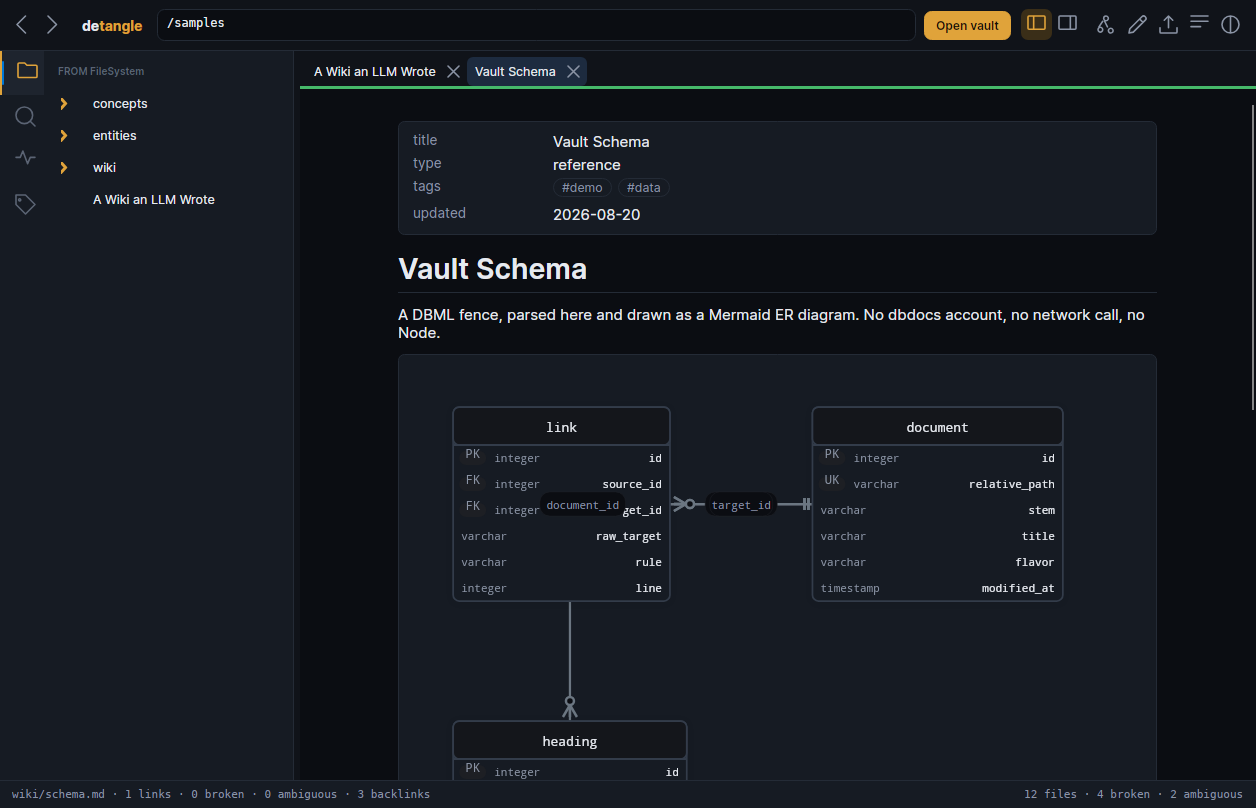
DBML
Parsed by a recursive-descent parser written for this app and drawn as an ER
diagram. The translation is lossy, so everything it drops — defaults, notes,
indexes, table groups — is listed under the picture instead.
Failures show their source
A fence that will not parse shows its text and the parser's complaint, with the
line. It never renders an empty box.
wiki/schema.md
DBMLParsed here and drawn as an ER diagram. No dbdocs account.1 link0 broken3 backlinks
Formats
It already knows what kind of wiki this is.
The conventions genuinely differ — the same link text means different things in
different tools — so the folder is sniffed before it is read.
Obsidian.obsidian/
Logseqlogseq/
MkDocsmkdocs.yml
Docusaurusdocusaurus.config.*
Dendrondendron.yml
Foam.vscode/foam.json
Quartzquartz.config.ts
Hugohugo.toml
Jekyll_config.yml
mdBookbook.toml
Zettelkasten202608201200-*.md
LLM Wikiwiki/ beside raw/
Plain markdownanything else
Graph
See the shape of what the model wrote.
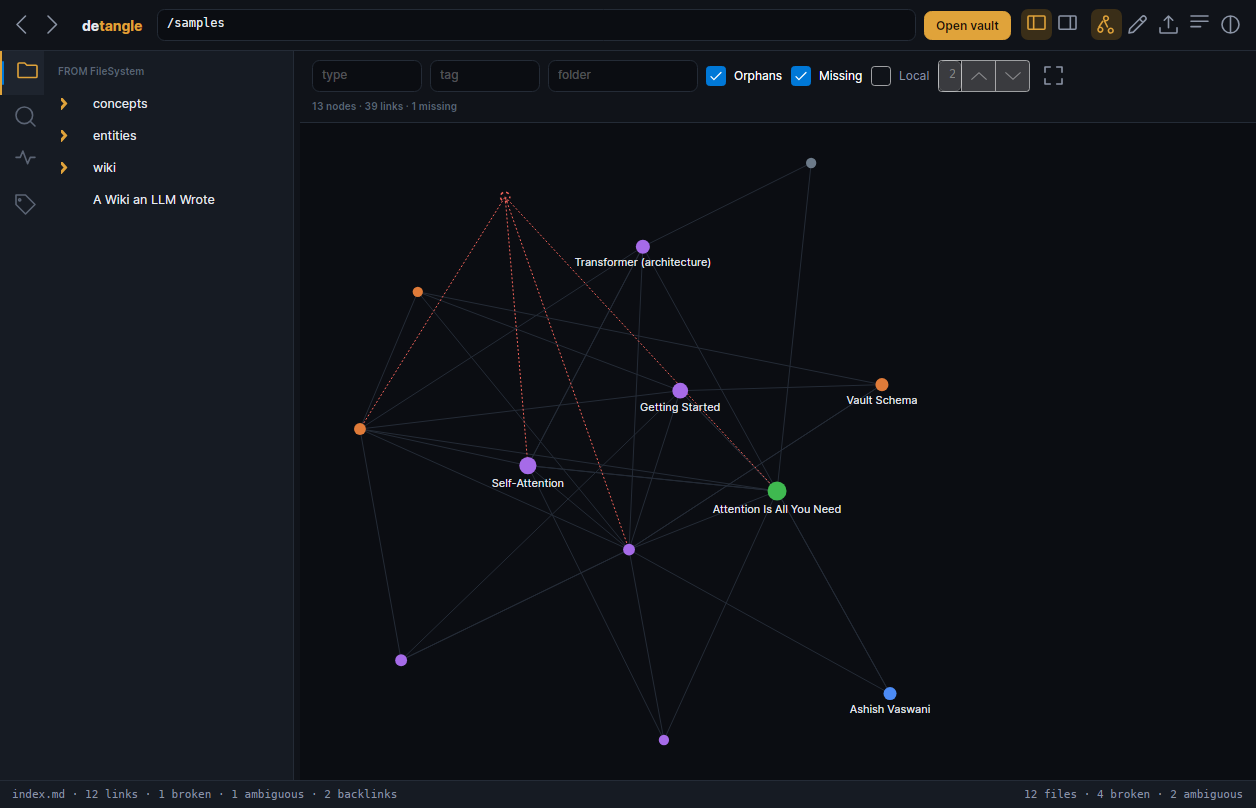
Node size is inbound links, colour is frontmatter type, hollow means nothing links
here, and a dashed outline is a page something links to that nobody wrote.
Missing pages are drawn.
In a wiki a model produced, they are the shape of the work left to do.
Local mode.
The neighbourhood of the page you were reading, N hops out, walked in both
directions — a page's backlinks are as much its neighbourhood as its own links.
It stays interactive.
Repulsion goes through a Barnes-Hut quadtree spread across cores: about 11 ms
per simulation step over a 5,000-page vault, inside a 33 ms frame. Above 1,500
nodes it folds to one node per folder, because a hairball is not a picture.
graph view — 13 nodes, 39 links, 1 missing
GraphColour is frontmatter type, size is inbound links. The dashed red edges lead to a page nothing has written yet.13 nodes39 links1 missing
Search
Find it before you finish typing.
SQLite FTS5 over the whole vault, with a field syntax for the things frontmatter
actually holds. Cold index of five thousand files in 3.3 seconds; every keystroke
after that answers in under 50 ms.
query syntax
attentionthe word, ranked by bm25"is all you need"the exact phrasetype:conceptfrontmatter typetag:llmand everything under llm/path:wiki/a folderupdated>2026-06-01changed since a date
Doctor
A list of problems became a review you finish.
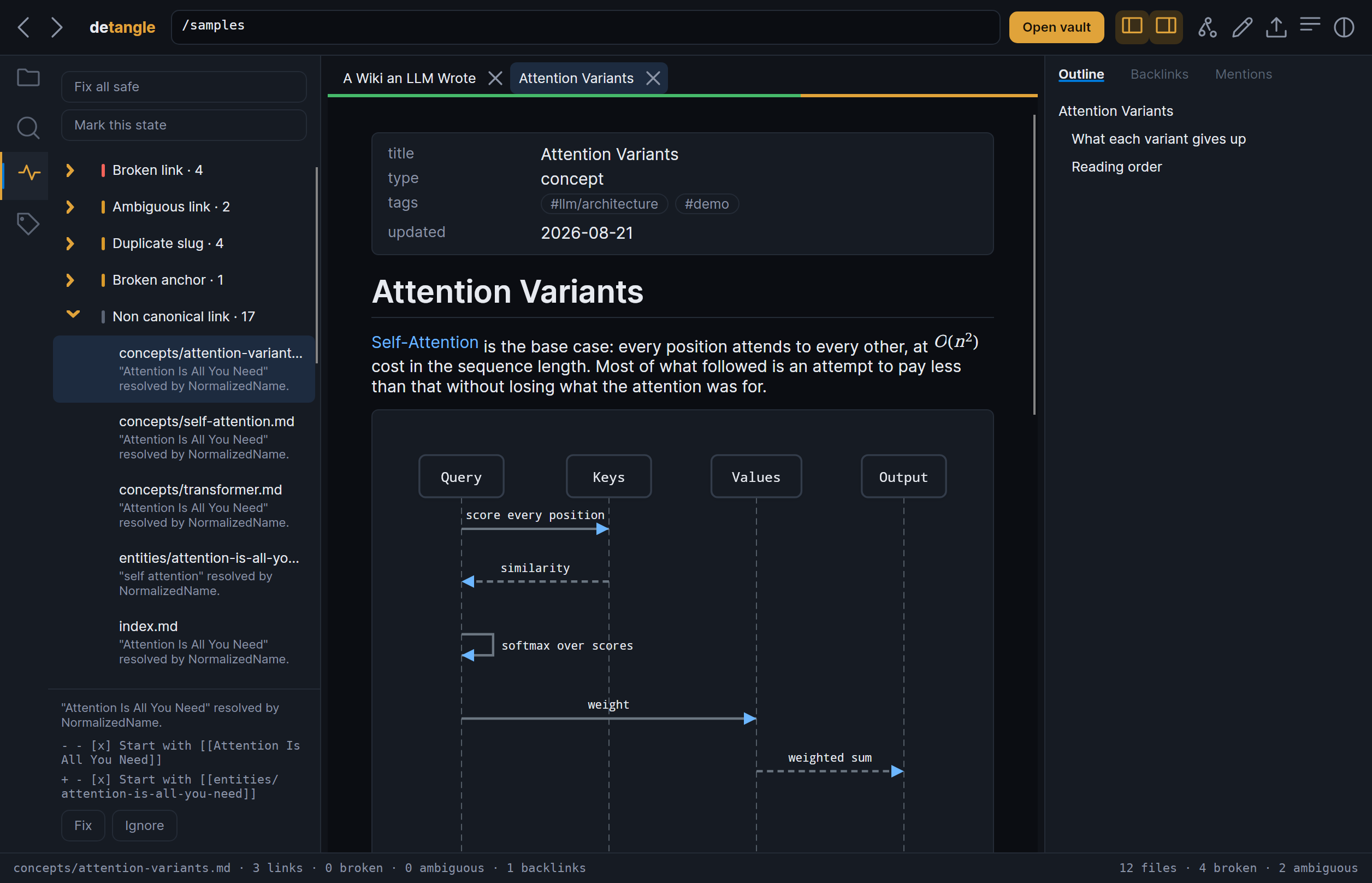
Grouped by kind, worst first, one finding at a time. The card under the list shows
the source line beside the line it would write — computed by the same function that
performs the fix, so the preview is the fix.
link doctor — 29 findings, six kinds
Triage deckEvery finding in the demo wiki, by kind. The card shows the exact line before and after, then fix or ignore.4 broken2 ambiguous17 non-canonical
A link can reach the right page and the wrong section.
getting-started#opne opens the file, lands you at the top, and
every other reader calls that a working link. Detangle reports it and names the
heading it probably meant.
Rung fourteen is the one you write.
An ambiguous link shows every file it could mean; pick one and it is remembered
for this vault. It is numbered last because it was added last, and consulted
first because it is not a guess.
The decision lands in .detangle-choices beside your markdown — one
sorted line per link, with the reason as a comment — so it commits, it diffs,
and everyone who checks the wiki out resolves that link the way you decided.
detangle-lint and the static export read the same file. The Doctor
lists every decision made, with a revoke beside each one.
Ignoring is keyed to the link, never the line.
Line numbers move every time the generator runs, and that is this product's
entire corpus. An ignore keyed to one would come back the moment you least
want to re-read a list you already finished.
two findings no other reader has
wiki/link-rules.md:38brokenAnchor No heading or block "What happens on opne"
in wiki/getting-started.md.
probably"What happens on open"wiki/link-rules.md:40dialectDrift"Multi-Head!" matched only after slugging;
other renderers will not follow it.
settling an ambiguous link
SettleThe marker sits after the link, not on it, so the link still follows on click. Your choice becomes rung fourteen for this vault.2 candidates1 remembered
In the browser demo, and on a folder Detangle cannot write back to, a settled choice
lasts for the session and the app says so rather than claiming a save that will not
survive.
Regeneration
Your links got worse and nothing told you.
Mark the state before the generator runs. Afterwards, Detangle names the links that
used to resolve exactly and now resolve only because a later rule rescued them.
Every other tool's link is binary — it works or it doesn't — so none of them can
describe a link that still works and works worse.
Detangle
1exact vault path
2note-relative path
3case-sensitive filename
4path suffix
5case-insensitive filename
6normalized name
7alias or title
8identifier
9folder index
10encoding variant
11extension probe
12nearest name
13placeholder
14remembered choice
Every other reader
works
broken
Nothing can fall, because there is nowhere to fall to.
Regeneration diffOne page moved out of its folder in the demo wiki. Five links fell down the ladder in three distinct ways — and not one of them stopped working, which is exactly why nothing else would have mentioned it.1 renamed page5 links fell0 broke
Mark once with --mark, commit .detangle-baseline.json, then
gate every regeneration on --fail-on-regression: exit 1 when a link broke
or fell, whatever the totals are. An already-broken wiki that did not get worse
passes, which is the whole point — --fail-on error fails on every run
once anything is broken, so it can never tell one run from another.
There is no automatic snapshot. The file watcher fires dozens of times during a
generation run, so a guess at when the generator finished would diff against half a
corpus — which is worse than no diff. You press a button, or you pass a flag.
CI
The same doctor, for the thing that wrote the wiki.
detangle-lint runs the identical pass from a terminal and prints JSON.
It ships inside the portable archive rather than the installers — those are for the
reader, this is for the pipeline.
Broken-link checkers are twenty years old, and lychee and
markdownlint already emit JSON. What none of them can emit is
which step of the chain each folder's links needed. That is feedback
the generator can act on, and it requires the ladder to exist.
--fail-on error, warning, info or never.
A broken link is the only Error, so gating on the default would never notice
the interesting findings. The flag exists because otherwise nobody would gate
on it at all.
--emit-patch plans the repair. It never applies one.
A unified diff you can read, review or pipe into git apply, with
the rung that resolved each link named above its hunk — so the patch says why,
not only what. The command still writes nothing to your wiki.
Eight links written inside wiki/ resolved. One of them by a rule that is
not a rescue.
Demo
Try it without installing anything.
The real reader, compiled to WebAssembly, holding a small wiki written the way a
model writes one. Open your browser's network tab: after the page loads, it stays
empty.
detangle
The real reader, compiled to WebAssembly — about 11 MB of .NET runtime. It does
not start downloading until you ask for it.
Same renderer, same resolver, same diagrams. The desktop build adds search, the file
watcher, editing and export. Jump straight to
the Mermaid page or
the DBML page.
Craft
Built like the tool it is.
Local-first is a set of decisions, not a slogan. These are the ones that cost
something.
No networkZero requests, including for diagrams
13 formatsDetected, not configured
5,000 filesCold index in 3.3 seconds
0 accountsYour wiki is just files
It does not change your files.
Unless you ask: saving, applying a fix, creating a missing note, or normalizing
links. Its index lives in a .detangle/ folder you can delete.
Exports keep the links.
Static site, one HTML file, PDF, or normalized markdown — all built from the
resolved model, so a link found by an alias is a working link in the output.
MIT, and self-contained.
One binary with the runtime inside it. Nothing to install first, no version to
match, and no dependency that can go missing.
Documentation
Read it before you download it.
Ten pages, written for somebody deciding whether this is worth the disk space.
Version 0.2.0, free and MIT. A release carries
forty-three files; nine of them are for a person, and the rest is the update feed.
These are the nine. Every build is 17–31 MB because the runtime is
inside it — there is nothing to install first.
Pick your platform below.
Not sure which file? Each one says what it is for.
The application and detangle-lint together, for CI.
The optional WebView diagram backend wants libwebkit2gtk-4.1-0.
Nothing else does, which is why it is a recommendation and not a dependency.
The other thirty-four files
RELEASES-*, assets.*.json, releases.*.json
and *-full.nupkg are the update feed. The application reads them to
find its next version; you never download one. SHA256SUMS is the
checksum list for everything above, so you can check that what you downloaded is
what was built.
detangle-0.2.0-win-x64.zip and its siblings are
not the same as Detangle-win-x64-Portable.zip: the lower-case archive
carries detangle-lint beside the application, and the other is the
reader on its own.
Signing certificates cost money this project does not take, which is the whole reason
for the two warnings above — the code is
right here if you would rather
build it: dotnet publish src/Detangle.Desktop and nothing else.